Toonly: AI Story & Comic Maker
- 4.1
- Rating
- 50.00K
- Installs
- Free
- Price
 Analysis by App-foxy
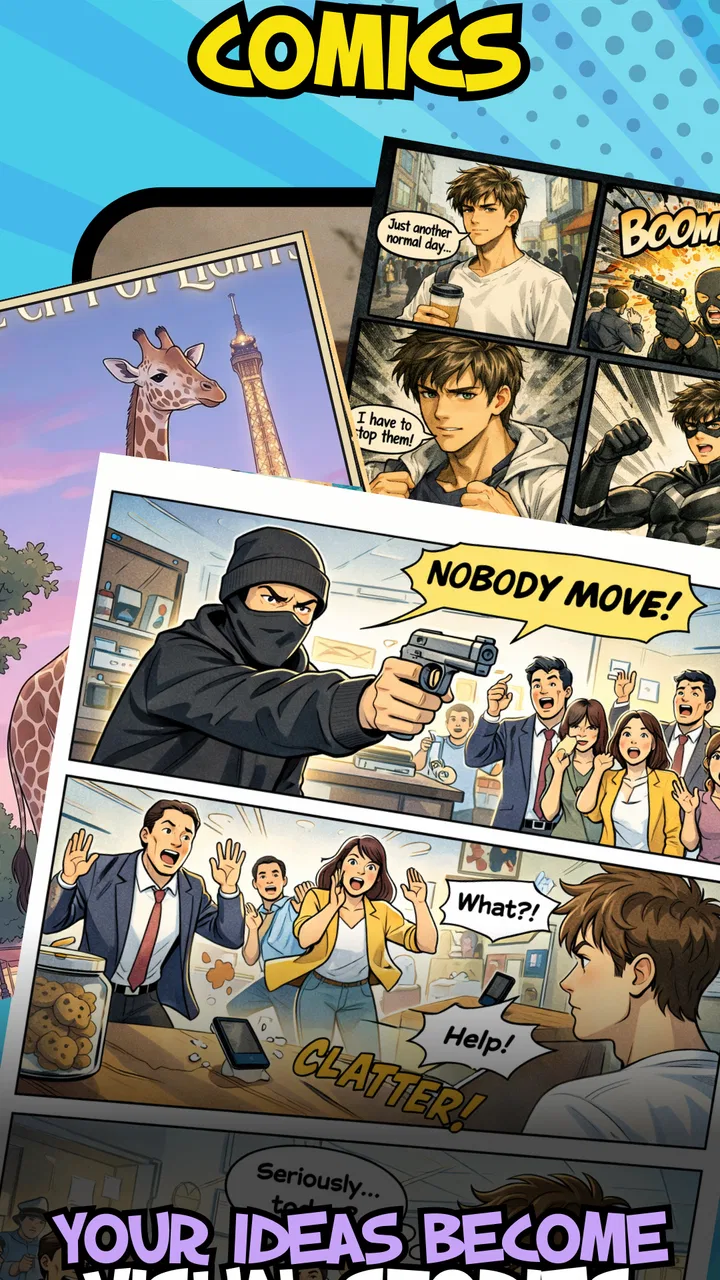
I approached Toonly: AI Story & Comic Maker as a tool for turning a rough story idea into something visual, rather than as a traditional comic reader. That distinction matters immediately. This is a free Comics app from Minu Pte. Ltd. that focuses on interactive stories, visual panels, and choices built from ready-made templates. If you want to experiment with a short branching tale without drawing every character yourself, the concept is appealing. If you expect a full illustration studio with precise control over every frame, you may find the experience more limited.
My overall impression is that Toonly is most useful when I already know the basic shape of a story. The app can help me move from “I have an idea” to “I can show this scene and let someone choose what happens next.” It is less convincing when I want to polish a long graphic novel, maintain a very specific visual identity, or edit every detail manually. The strongest experience comes from treating it as a quick creative workspace, not as a replacement for professional comic software.
Where the first-time experience can become confusing
The biggest potential stumbling block is understanding what kind of app this is. The word “comic” can suggest a page-by-page reading app, but Toonly is aimed at making comics and interactive stories. That means the first useful question is not “Which series can I read here?” but “What story do I want to build?” Users who open it expecting a library of finished comics may feel lost before they have even started.
You May Also Like

 Blood Strike: 2.5 Anniversary
Blood Strike’s Loadouts Turn Every Drop Into a Tactical Gamble
A close look at Blood Strike’s custom loadouts: how fast access to signature weapons reshapes its battle royale rhythm, rewards preparation, and narrows the gap between fights.

 Pandora - Music & Podcasts
Pandora’s Music Is Easy to Start, but Harder to Recover
Pandora’s strength is its low-effort path from a seed to a station. Its weak spot is how much confidence it asks you to place in connection, setup, and quiet recovery.

 8 Ball Pool
 Is Built on Rivalries, Rematches, and Routine
A close look at the rivalries, rematches, shared routines, and unanswered safety questions that turn a quick pool match into a persistent mobile community.

 Samsung Music
’s Quiet Strength Is Playing What You Already Own
Its reach comes less from spectacle than from dependable access to a personal library. That simplicity is both the app’s strongest retention engine and its ceiling.

 AccuWeather: Weather Radar
AccuWeather Review: A Quick, Clear Forecast for Everyday Decisions
For everyday plans, the best forecast is the one you can understand quickly. AccuWeather makes rain timing, radar, and local conditions easy to act on, with a few trade-offs.

 Hill Climb Racing
Why Hill Climb Racing Still Turns Crashes Into One More Run
A tiny car, a bumpy hill and one more upgrade: Hill Climb Racing keeps resurfacing because its simple chaos makes every near-miss feel personal.
More From Our News Desk



I would begin with a very small idea: a character choosing between two actions, a short joke with an alternate ending, or a mini adventure with one decision. Starting small makes the template-based approach easier to understand. It also gives me a way to judge whether the available structure suits my style before I invest time in a larger project or consider any optional purchase.
Another source of friction is the difference between a template and a finished story. A template can provide a helpful starting arrangement, but it is not automatically a complete narrative. I still need to decide what the characters are doing, what each choice means, and whether the branches feel worthwhile. The app’s AI-oriented concept may speed up the creative step, but it does not remove the need for editing. A generated or suggested idea can be visually convenient while still sounding flat, confusing, or out of character.
I found that the best results come from giving the story a clear purpose before touching the editor. For example, if I am making a short birthday greeting, I can focus on a single emotional payoff. If I am creating a classroom exercise, I can make each choice test a different outcome. If I am building a social post, I can keep the interaction short enough that people will actually finish it. Without that purpose, it is easy to spend time changing panels without improving the story.
There is also a practical learning curve in deciding how much information belongs in each scene. A comic panel can communicate mood and action visually, while a choice needs to be clear enough that the reader understands its consequence. I try not to put the entire explanation into dialogue. A short line, a visible reaction, and a meaningful choice usually work better than a crowded scene that asks the reader to decode everything at once.
What I would prepare before creating a story
Before starting, I write down three things: the opening situation, the decision the reader must make, and the result of each option. This simple outline prevents a common problem with interactive comics: choices that look different but lead to nearly identical outcomes. Even in a very short project, the reader should feel that the decision mattered.
I also decide on the intended audience. The app is rated Everyone, which makes it approachable for broad, family-friendly ideas, but that does not mean every story will suit every reader. A child-focused story needs simpler wording and obvious choices. A humorous piece for adults can rely on timing and implication. Planning this before assembling scenes helps me avoid rewriting text after the visual structure is already in place.
For a realistic everyday example, imagine that I want to make a quick interactive invitation for a weekend picnic. I could open a suitable template, establish the location, present a character asking whether to bring sandwiches or fruit, and let the next scene reveal the result. The point is not to create a long comic; it is to make a small message more engaging than a plain block of text. That is the kind of task where Toonly makes the most sense to me.
Setup checks that save time later
Before blaming the app for a failed start, I would check the basics. Toonly currently lists version 0.6.2 and requires Android 7.0 or later. On an older phone, the operating-system requirement is the first thing to verify. On a compatible device, I would still make sure the app has been installed cleanly and that the phone has enough free working space for a creative project.
The app is free to install, but optional in-app purchases range from $2.49 to $59.99 per item. I would treat that as a reason to explore the free experience first, not as a promise that every tool is included without cost. Before confirming a purchase, I would check exactly what is being unlocked and whether it solves a problem I am actually having. A paid option is easier to evaluate after I have created a small test story.
I would also use a stable connection during the initial setup and whenever the app is doing anything that depends on online processing. I cannot assume that every part of an AI-assisted workflow behaves like an offline drawing tool. If a screen appears to pause, I would wait briefly, check the connection, and avoid repeatedly tapping the same control. Repeated attempts can make it harder to tell whether the issue is a slow request or an accidental duplicate action.
Keeping the first project short is another useful setup check. A tiny test lets me confirm that I understand the editor, the template flow, and the choice structure before I create a more ambitious story. I would use plain text, a small number of scenes, and one clear branch. If that works, I can add personality and complexity in stages instead of trying to diagnose several possible problems at once.
Device compatibility is not the only consideration. A phone with a small screen may make detailed editing feel cramped, especially when I am switching between visual elements and story text. I prefer to work in short sessions and review the result at normal reading size. Zooming in to edit can hide the fact that dialogue is too long or that a choice is difficult to read when the whole scene is visible.
Recovering a workflow when a story goes wrong
When a project does not behave as expected, my first recovery step is to simplify it rather than rebuild everything. I would return to the last scene that worked, remove the newest change, and test again. If the problem disappears, I know where to focus. This is more reliable than changing several scenes at once and hoping the result improves.
I would keep a separate rough outline of the story while editing. That outline becomes especially useful if I need to recreate a scene. It also protects the creative idea from the technical problem: even if an arrangement becomes messy, I still know the intended sequence, dialogue, and branch outcomes. For a short interactive comic, a simple numbered list is usually enough.
A practical recovery method is to build the main path first. I create the opening and one complete outcome, then test whether the sequence makes sense from the reader’s point of view. Only after that do I add the alternate path. This exposes structural problems early. If I build both branches simultaneously, I can lose track of which choice leads where and end up fixing the same confusion in multiple places.
I also read every choice as if I know nothing about the story. A creator may understand the context because they wrote it, while a reader sees only the current scene. If the options are vague, overly similar, or written as instructions instead of natural choices, the interaction feels artificial. I rewrite them to describe actions or intentions clearly, then check that each result follows logically.
AI-assisted creation is most helpful to me as a starting point. I would use it to break through a blank page, suggest a direction, or help turn a simple premise into a sequence of scenes. I would not accept the first result without checking tone, continuity, and appropriateness. The fastest workflow is often generate, inspect, shorten, and personalize. That is still quicker than starting from nothing, but it keeps the final story under my control.
One non-obvious advantage of a branching format is that it exposes weak storytelling quickly. In a normal comic, a vague motivation may pass because the reader simply continues. In an interactive comic, the reader must understand why a decision is being offered. If I cannot explain the choice in one clear sentence, the scene probably needs work. I see that as a creative diagnostic, not merely an editing inconvenience.
When the app is not the cause of the problem
Not every disappointing result comes from the software. Sometimes the source material is simply too ambitious for a quick template-driven workflow. A story with many characters, several timelines, or highly specific visual requirements may need a dedicated illustration and layout program. In that situation, Toonly can still help me sketch the structure, but I would not expect it to deliver the final production by itself.
There is also a difference between a technical failure and a weak narrative. If the scenes load but the story feels dull, changing the device or reinstalling the app will not solve it. I would look at the opening, remove unnecessary exposition, and make the first choice arrive sooner. Interactive content needs a reason for the reader to participate; simply adding a button or branch does not create that reason.
Likewise, if the visuals feel generic, that may be the trade-off for working from ready-made templates. Templates reduce the time needed to assemble a scene, but they can also make different projects feel similar. I would compensate by focusing on sharper dialogue, a distinctive premise, and consistent character decisions. If visual originality is the main goal, a drawing-focused app is probably a better fit.
Compared with reading apps, Toonly offers a completely different value. A reader app is better when I want a polished catalog and immediate entertainment. Toonly is better when I want to create something, test a choice-based idea, or share a small visual message. Compared with traditional comic-making tools, it appears more approachable for quick experiments, while giving up some of the detailed control that experienced artists expect.
Compared with writing apps, its advantage is the visible sequence. I can think in scenes and reader decisions rather than only paragraphs. The trade-off is that a branching story requires more planning than a linear note. If I only need to draft dialogue, a plain writing tool is faster. If I want the reader to interact with the result, Toonly gives the idea a more suitable shape.
Who will get the most from Toonly?
I would recommend it to beginners who want to try interactive comics without first learning a full illustration workflow. It also makes sense for teachers, parents, hobby writers, and social creators who need a compact visual story rather than a long-form publication. The Everyone age rating supports broad use, although I would still review anything intended for children before sharing it.
It is particularly useful for testing concepts. I can turn a rough premise into a short branch and discover whether the decision feels meaningful. That makes it valuable before investing in a larger project elsewhere. A writer could use it to explore alternate endings, while a presenter could use a choice-based scene to make a simple explanation more memorable.
I would skip it if I need professional page composition, advanced illustration control, extensive character customization, or a large finished comic assembled with precision. I would also skip it if I have no interest in creating stories and only want to read comics. In those cases, a dedicated drawing, publishing, or reading app would be a more direct choice.
The app’s current average rating is 4.3 from around 2K ratings, and it has passed 50K installs. Those figures suggest that it has attracted a meaningful early audience, but I would still approach it as a developing creative tool rather than a mature replacement for every comic workflow. Its release on Mar 6, 2026, and the relatively early version number reinforce that expectation: the experience may evolve, and my own results will depend heavily on how well my project matches its current design.
My practical verdict after using the concept as intended
Toonly is worth trying when the goal is to make a short, choice-based comic quickly. I like the way its template and AI-centered approach can reduce the intimidating blank-page problem. The app gives a beginner a clear reason to think in scenes, decisions, and outcomes, which is more useful than simply placing decorative panels around unfinished text.
My advice is to begin with one branch, test it on a compatible Android device, and judge the free workflow before considering an in-app purchase. Keep a separate outline, build the main path before the alternate one, and edit generated material as carefully as any other draft. Those habits address the most likely friction without pretending that the app can solve story structure or artistic direction automatically.
The best reason to choose Toonly is speed with a sense of interaction; the best reason to look elsewhere is the need for deep creative control. For a quick invitation, classroom exercise, joke, mini adventure, or prototype, I can see myself recommending it to a friend. For a polished graphic novel or a highly customized visual production, I would use it only as an early sketching step and move to a more specialized tool for the final work.
As a free Comics app from Minu Pte. Ltd., Toonly has a focused idea and a practical entry point. It is not magic, and the AI element does not replace decisions about pacing, clarity, or audience. But when I keep the project compact and treat the templates as a starting framework rather than a finished answer, it becomes a genuinely approachable way to experiment with interactive storytelling.
FAQs for Toonly: AI Story & Comic Maker
01What is Toonly: AI Story & Comic Maker?
Toonly is a creative app that allows users to craft stories and comics using AI technology. It offers a variety of templates, characters, and scenes to help you easily design and animate your projects, making it perfect for both beginners and seasoned storytellers.
02Is Toonly suitable for beginners?
Yes, Toonly is designed with user-friendliness in mind, making it accessible for beginners. The app provides intuitive drag-and-drop features, pre-made templates, and a straightforward interface that simplifies the process of creating stories and comics without prior design experience.
03What features does Toonly offer for comic creation?
Toonly offers a range of features for comic creation, including customizable characters, diverse backgrounds, and AI-driven animation options. Users can also add dialogues, special effects, and music to bring their stories to life, ensuring a dynamic and engaging comic-making experience.
04Can I export and share my creations from Toonly?
Yes, Toonly allows you to export your creations in various formats suitable for sharing on social media platforms, websites, or printing. The app ensures that your stories and comics maintain high quality, enabling you to showcase your work professionally.
05Are there any in-app purchases in Toonly?
While Toonly offers a free version with essential features, there are in-app purchases available for additional templates, characters, and premium content. These purchases enhance the creative possibilities and provide a more comprehensive storytelling experience for dedicated users.
Pros
- Intuitive interface for easy use.
- Wide variety of templates available.
- AI-driven features enhance creativity.
- Export options for multiple formats.
- Regular updates with new features.
Cons
- Limited customization in free version.
- Requires internet for some features.
- Occasional app lag on older devices.
- Limited font choices in free version.
- Premium features can be costly.

Toonly: AI Story & Comic Maker
Gallery